Selection guide · Kanban System
Kanban System: how to choose
Kanban card holders for KLT containers, boxes, packages and shelves, mailboxes to collect the cards, Systembox and Cardplan® boards for the kanban traffic light and the heijunka board: answer 4 questions and we will show you the right products, and why.
- Pull, not pushReplenish only what has been consumed: the card from the empty container is the order.
- Visual managementCards, colours and the board show everyone what is missing and what must be produced first, without searching the ERP.
- Simple loopCard holder on the material, collection box and board: three elements that grow one item code at a time.
Where does the card go?
How is it fixed?
For the board: wall-mounted, on metal or on wheels.
Which cards do you use?
Do you work in an ESD protected area (EPA)?
Configure your Cardplan® board or your Systembox: rows, columns, mounting and bill of item codes →
Go to:How it worksApplicationsComparisonGood to knowQuestions
How kanban works
The card travels with the material
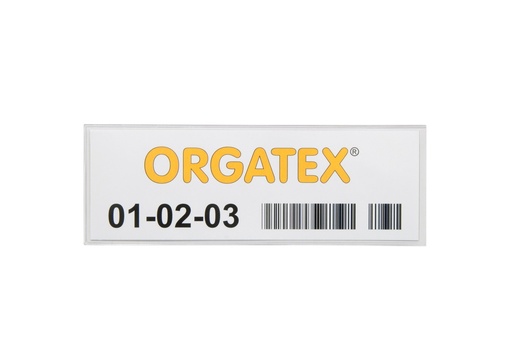
Every full container has its card: item code, description, quantity, supplier or department, location and barcode. It is protected by a sleeve or a Kanban-Cover.
Empty container, card in the mailbox
When the container is empty, the operator removes the card and drops it into the kanban mailbox: this is the reorder signal.
On the board, in the right order
At set times, whoever manages reordering takes the cards to the board, one column per item code, divided into green, yellow and red zones. With the heijunka board you distribute orders across time slots.
Reordering and replenishment
In the yellow zone the reorder is planned; in the red zone you produce or replenish immediately. The material returns to the line with its card and the loop starts again.
Read the barcode or QR code through the sleeve with a scanner: the card remains the visual signal on the shop floor and the reorder is also triggered in the ERP.
Where it is used: applications
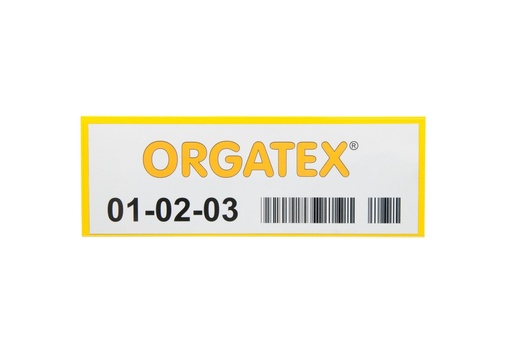
KLT containers and Euroboxes
The sleeve slides into the label holder slot and goes onto the board without removing the card.
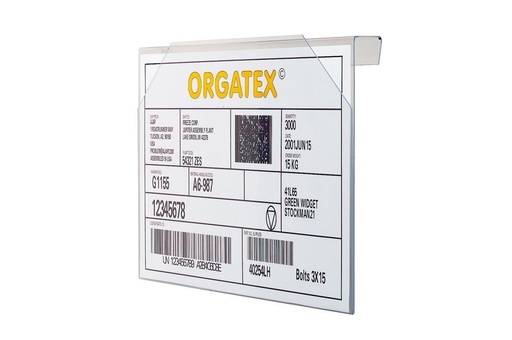
Boxes and containers without a slot
To hang on the edge, up to 17 mm, or to fix to the side wall with a magnet or adhesive.
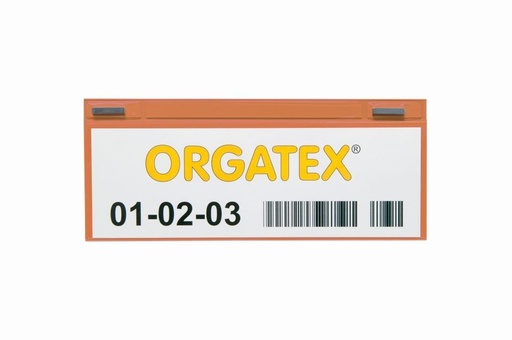
Machines, drums and metal
Neodymium magnets, even on curved surfaces: the card is moved by hand, without tools.
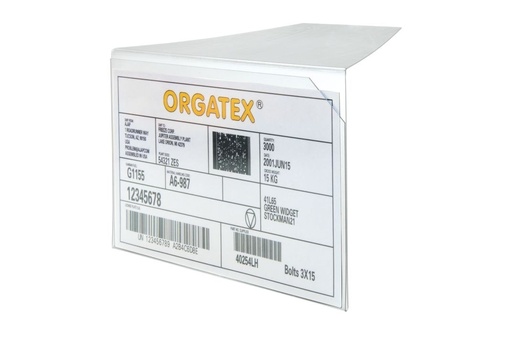
Cartons, packages and small parts
Between stacked packages with the 90° tab, or placed on top of class C bulk material.
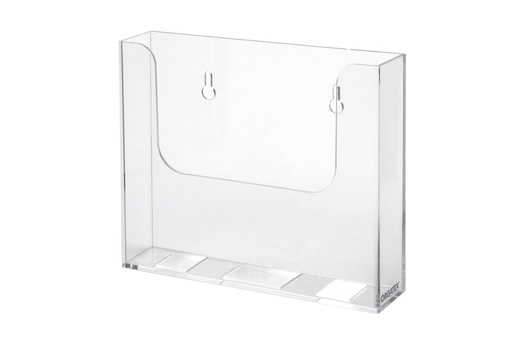
Card collection
Transparent box, wall-mounted, magnetic or free-standing; or sleeves hung on hooks and brackets.
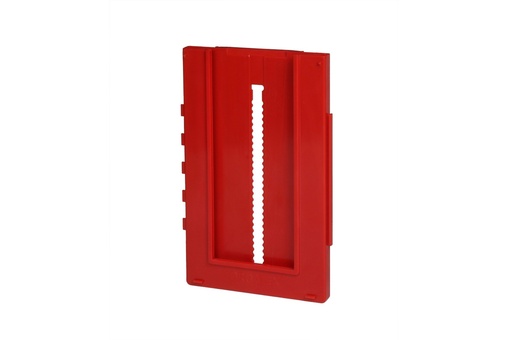
Kanban traffic light board
One Systembox per card, in columns per item code; or the ready-sized Starter Set.
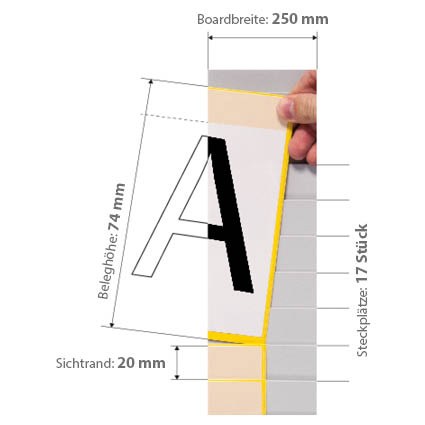
Heijunka and visual management
Pockets with a visible edge for cards, orders and jobs; mobile on the stand.
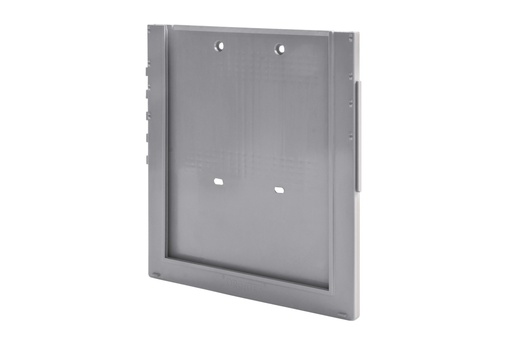
A4 documents at the line
A4 pick lists, instructions and orders in snap-in boxes, on the same board as the cards.
Electronics EPAs
Dissipative sleeves and card holders, Systembox and mailbox with low electrostatic charge.
Quick comparison
Card holders for containers and locations
| Product | Where it goes | Fixing | Formats and card insert | Material and colours | ESD |
|---|---|---|---|---|---|
| Kanban sleeves | |||||
| KAN-Label | Label holder slot of KLT and Euroboxes, insert-type boards | In the slot, side insertion VDA 4902 | 210 × 80 · 1/3 DIN · A5 ET670 · ET85 · ET135 | Sleeve closed on 3 sides 9 colours · 50 pcs | KAN-Label ESD |
| KLT-Snapper | Label holder slot of KLTs | In the slot, top insertion VDA 4902 | 210 × 80 · 1/3 DIN · A5 ET670 · ET85 · ET135 | Rigid PVC 9 colours · 50 pcs | KLT-Snapper ESD |
| KAN-Label ESD | Label holder slot in EPAs | In the slot, side insertion VDA 4902 | 210 × 80 · 1/3 DIN · A5 ET670 · ET85 · ET135 | Dissipative IDP film 0.25 mm transparent · 50 pcs | DIN EN 61340-5-1 |
| KLT-Snapper ESD | Label holder slot of KLTs in EPAs | In the slot, top insertion VDA 4902 | 210 × 80 · 1/3 DIN · A5 ET670 · ET85 · ET135 | Dissipative IDP film 0.25 mm transparent · 50 pcs | DIN EN 61340-5-1 |
| KAN-Label Magnetic | Machines, drums, containers and metal shelves | Neodymium magnets even on curved surfaces | 210 × 80 ET670 | Sleeve closed on 3 sides 9 colours · 50 pcs | — |
| KAN-Special | Hooks, brackets and bars; also on the container | Hanging Euro hole and slot | Inside 150 × 67 mm ET650 | Sleeve with punched header 9 colours · 50 pcs | — |
| Kanban-Cover | |||||
| Kanban-Cover | Containers, shelves and machines without a slot | Magnetic or adhesive magnet on iron only | EC · DIN A7 · A6 · A5 · 1/4 DIN 1/4 DIN 220 × 80 mm | Transparent rigid PVC UV-resistant · 10 pcs | — |
| Hanging Kanban-Cover | Euroboxes, boxes, baskets with an edge | Hung on the edge edges up to 17 mm | EC · DIN A7 · A6 · A5 · 1/4 DIN 1/4 DIN 215 × 80 mm | Transparent rigid PVC stackable containers · 10 pcs | ESD version 1/4 DIN |
| Hanging Kanban-Cover ESD | Containers with an edge in EPAs | Hung on the edge edges up to 17 mm | 1/4 DIN 215 × 80 × 16 mm | Dissipative IDP film 10 pcs | DIN EN 61340-5-1 |
| Angled Kanban-Cover | Stacked cartons, boxes and panels | 90° tab between two layers, no adhesives | DIN A7 · A6 · A5 · 1/4 DIN all landscape | Transparent rigid PVC UV-resistant · 10 pcs | — |
| Kanban-Cover Mega | Bulk material and small parts in open containers | None placed on top, held by its own weight | 1/3 DIN 215 × 100 mm | Matt anti-glare plastic scratch-resistant · 10 pcs | — |
Collection, Systembox and boards
| Product | What it is for | Cards | Capacity or dimensions | Mounting | ESD |
|---|---|---|---|---|---|
| Card collection | |||||
| Kanban mailbox | Collects the cards from empty containers | A6, A5, A5 landscape, A4 | Up to 40 VDA 4902 cards depth over 35 mm | Wall-mounted, magnetic or free-standing | ESD version |
| Kanban mailbox ESD | Collection in EPAs | A6 portrait | Up to 40 VDA 4902 cards 115 × 155 × 38 mm | Wall-mounted, 2 screws | Low-charge ABS |
| Kanban and heijunka boards | |||||
| Systembox | One card per box: traffic light, heijunka, lot size | Up to 118 × 190 mm from DIN A7 with the adjustable bottom | 122 × 192 × 10 mm 8 colours · 50 pcs | On the wall or on a whiteboard, stainless steel supports | Systembox ESD |
| Systembox ESD | Kanban boards in EPAs | Up to 118 × 190 mm | 122 × 192 × 10 mm with top and front plastics · 10 pcs | On the wall or on a board, stainless steel supports | Low-charge ABS |
| Systembox A4 | A4 pick lists, instructions and orders | DIN A4 | 242 × 262 mm 6 or 18 mm filling | On the wall or on a whiteboard, with the Systemboxes | — |
| Kanban Starter Set | Complete kanban board with Systembox | Up to 200, 300 or 400 sizes M, L, XL | Whiteboards 500 × 1085 mm 2, 3 or 4 per size | Mobile on the stand or wall-mounted | — |
| Insert-type Cardplan® | Kanban traffic light, heijunka, visual management | From DIN A8 to A4 visible edge 15–90 mm | From 2 to 59 pockets panels 250 or 500 × 440–1244 mm | Z-profiles, wall rails, magnetic strips or stand | — |
| Cardplan® board stand | Mobile board for departments and meetings | Cardplan® boards and whiteboards | Width 1290–2040 mm height 1800 mm, depth 600 mm | On wheels, usable on both sides | — |
Full formats, item codes and accessories are on the individual product pages.
Good to know before you choose
From sleeve to card insert
- 210 × 80 sleeves: ET670 card insert (67 × 200 mm); 1/3 DIN: ET85; DIN A5: ET135; KAN-Special: ET650.
- Micro-perforated A4 sheets to print on your office printer, with Word and Excel templates.
- Systembox: 33 × 75 mm card inserts for the top plastic and 75 × 168 mm for the front.
Colours: flow and traffic light
- On the container, the sleeve colour indicates department, line or supplier: 9 colours, including transparent.
- On the board, colour marks the zones: green normal stock, yellow plan, red produce immediately.
- With light grey boxes and coloured card inserts, you move the thresholds by changing only the inserts.
EPAs
- Hanging Kanban-Cover ESD: dissipative IDP film, DIN EN 61340-5-1.
- KAN-Label ESD and KLT-Snapper ESD sleeves in 0.25 mm IDP film, in the same formats and with the same card inserts.
- Systembox ESD and kanban mailbox ESD in low electrostatic charge ABS.
Kanban system FAQ
What is the kanban system and what is the card for?
Kanban is a method for managing replenishment based on the pull principle: you produce or replenish only what has been consumed. The signal is the card: it travels with the full container and, when the container is empty, it goes back and becomes the reorder. On the kanban board the cards are sorted by item code and show at a glance what needs replenishing and how urgently.
How do you size a kanban: how many cards are needed for each item code?
Start from three numbers: average consumption (pieces per day), replenishment lead time (days from the signal to the arrival of the material) and quantity per container. The number of cards is consumption × replenishment lead time, plus safety stock, divided by the quantity per container, rounded up. Example: 200 pieces per day, 3 days, 20% safety and 100 pieces per container give 200 × 3 × 1.2 / 100 = 7.2, i.e. 8 cards. After a few weeks, adjust the number by looking at the board: if the cards always stay in the green, you can remove one.
Production, withdrawal or supplier kanban: what is the difference?
The withdrawal kanban authorises moving material from the warehouse or supermarket to the line. The production kanban authorises the upstream department to produce the quantity shown on the card. With the supplier kanban, the card becomes the order to the external supplier. Card holders, mailboxes and boards are the same: only the text and colour of the card change, so each loop is recognised immediately.
Kanban board, heijunka board or lot size kanban: which one do I need?
The kanban traffic light board collects the cards by item code: in the yellow you decide whether to reorder, in the red you produce immediately. The heijunka board distributes orders on a time grid, for example 30-minute slots, and levels the load of upstream departments. The lot size kanban collects cards until the set batch is reached and only then releases the order. All of them are built with Systembox or Cardplan®: tell us how you work and we will propose the layout.
Systembox or Cardplan®: which board should I choose?
With Systembox each card has its own box: columns grow one position at a time and the traffic light is visible even from a distance, thanks to the 8 colours. It is the best choice when all cards have the same format, up to 118 × 190 mm. Cardplan® has overlapping pockets in which only the edge remains visible: more cards fit in the same space, even in different formats, from DIN A8 to A4. It is the choice for heijunka, orders and visual management. To get started without choosing the components, there is the Kanban Starter Set.
Kanban sleeve or Kanban-Cover: how do I choose the card holder?
Look at the container first. If it has a label holder slot, like KLTs and Euroboxes, use a sleeve: KAN-Label or KLT-Snapper. If it does not, choose a Kanban-Cover: hanging for edges up to 17 mm, magnetic on metal, adhesive on plastic and other surfaces. For stacked cartons and packages there is the angled Kanban-Cover, for bulk material the Mega. On machines and curved metal surfaces, the KAN-Label Magnetic.
How are colours used in the kanban system?
On two levels, without mixing them. On the container, the sleeve colour indicates the loop: one colour per department, line, supplier or kanban type. On the board, the colour marks urgency: green normal stock, yellow plan, red produce or replenish immediately. Write the colour rule on a sign next to the board, so it applies to all shifts.
Does kanban also work with the ERP and a scanner?
Yes. Print the item’s barcode or QR code on the card: sleeves and Kanban-Covers can be read with a scanner without removing the card. This way the reorder is also triggered in the ERP, while the card remains the visual signal on the shop floor and on the board. You print the cards in the office on pre-cut card stock, with the Word and Excel templates.
What do you need for kanban in an ESD protected area?
In EPA areas, use dissipative or low-charge card holders and accessories. On our website you will find the hanging ESD Kanban-Cover, made of IDP film that meets the requirements of DIN EN 61340-5-1, the KAN-Label ESD and KLT-Snapper ESD sleeves in 0.25 mm dissipative IDP film, the ESD Systembox and the ESD kanban mailbox in low-charge ABS. They come in the same formats as the standard versions, and the sleeves use the same cards.
Where do I start when introducing kanban in my department?
With a pilot area: one line or one supermarket, with a few part numbers that have steady consumption. You calculate the cards for each part number, choose holders that fit the containers, a mailbox where the cards are removed and a board sized with room for the part numbers you will add. We help you choose products, formats and quantities and supply everything, also as a Kanban Starter Set; once the loop works, you extend it to other departments.
Setting up kanban in your department?
Tell us how many containers, part numbers and workstations you have: we will recommend holders, formats and quantities.